Have you ever been curious about how code is tested? Or maybe why there are constantly bugs in your apps? Or even why your apps are constantly being updated but there is no visual change? This all falls under the realm of Software Testing.
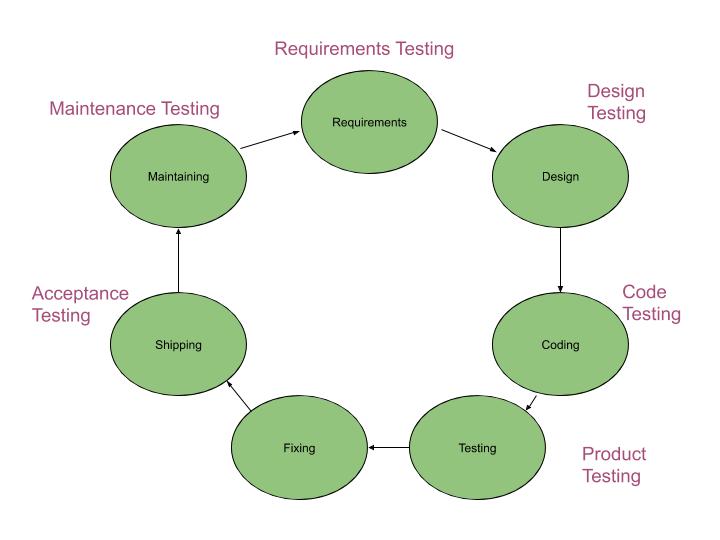
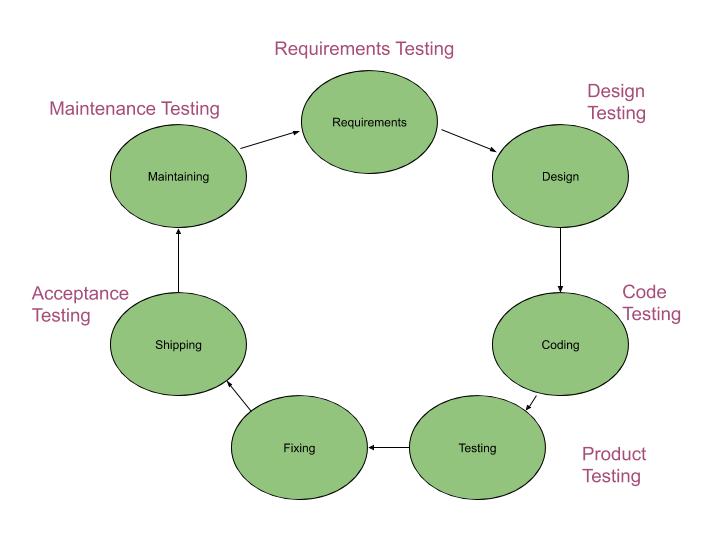
There are many different types of testing and each type can be shown in a development cycle which is shown in the diagram below.
Software testing is required because software can contain a vast amount of defects. A human being can make an error which can result in a software defect, otherwise known as a bug or fault. If this code is executed, it may cause a system to crash which is called a failure. Failures can also be caused by environmental conditions such as magnetism or radiation as they can affect the hardware and therefore affect the execution of the software.
So a failure is a deviation of the software from its expected service. A software defect can cause a software failure when the the software is run with certain inputs that expose the defect.
But what exactly is a defect then? A defect is a human error in the software. They may be caused at any stage such as in the requirements, design or coding stage. A default can also be known as a ‘bug’ or a ‘fault’.
It’s important to note that errors are not necessarily caused by incompetence or ignorance. It is simply a human action that produces an incorrect result.
Role of Software Tesing
So we have our definitions down, but what role does software testing play in the development of an application? Rigorous testing reduces the risk of problems occurring in the environment and it also contributes to the quality of the product. Reducing risk is very important, especially for new products as the risk associated with them is immense, and a product’s operation and quality on first release can make or break a company. There may also be industry or legal standards that a product will have to meet and so testing can help achieve this. Contractual requirements can also come into play and the software will need to adhere to them. So acceptance tests can help to see if the software does indeed adhere to them. Testing can also measure the quality of the software and it can improve the quality as a test may find defects that can be fixed.
It is important to understand that tests cannot cover everything. For most programs, the possible domain of inputs is simply too large to test for and so we have to be intelligent with our testing to construct tests that will expose most types of defects. A observation that has emerged from software testing is that bugs tend to cluster together. There may be some areas of software that are completely bug-free while others that have plenty of bugs.
What is Testing?
If we want a strict definition of testing, we can understand it as a systematic exploration of a system with the aim of finding and reporting bugs. This testing is then repeated to ensure that the corrections are effective and don’t create more bugs in other areas.
Debugging
Another thing we will want to be aware of before we begin our examination of software testing is debugging. Debugging is done by developers and it includes identifying the cause of defects and to make corrections to remove them.
If you write code incorrectly, the program will give you an incorrect answer. Computers will only do exactly what you have told them to do. So if you unknowingly tell them to do something you don’t want them to do, then they will end up giving you a result you don’t want. A defect produced by the developer can arise here when the developer’s expectation of the program doesn’t match with the actual program. Developers can use a tool called a debugger to find these defects. The debugger allows developers to step through their code a line at a time. It will identify the values stored in variables along each step.
Test
So a test is controlled exercise with an expected outcome and the actual outcome. The test will pass or fail depending on if these deviate from each other or not. We can break a test down further into a few components for clarity. Each test contains an object being tested, a definition of the environment, a definition of the inputs and a definition of the expected outcome.
Stages of Testing
There are many stages to testing:
- Planning.
- Control.
- Test Analysis.
- Test Design.
- Test Implementation.
- Test Execution.
- Evaluation of Exit Criteria and Reporting.
- Test Closure.

So let’s take a closer look at what these steps really mean.
Planning
The implementation of the test strategy is determined here. This includes what will or will not be done. It identifies the scope, approach and dependencies of the test. Dependencies can include suitable infrastructure and software in order to test. There are certain tasks which should be completed in this step which include:
- Determining scope and risks as well as identifying objectives of test.
- Determining the test approach (technique, coverage etc.).
- Determining required test resources (people, test environments, computers).
- Implementing the test policy.
- Scheduling test analysis and design.
- Scheduling test implementation, execution and evaluation.
- Determining the exit criteria.
Control
The Control Step includes the following tasks:
- Measuring and analysing results.
- Monitoring and documenting test progress, coverage and exit criteria.
- Initiation of corrective actions.
Analysis
Test Analysis is the step in the process where test conditions and test designs are derived from baseline documents (specifications/requirements). So first the test basis (requirements, interfaces, architecture etc.) is reviewed. If the basis is testable, then the test conditions are defined.
Design
This includes designing the test environment set-up and identifying required infrastructure or tools. A test inventory is then prepared. A test inventory includes the features to be tested, logical test cases to be executed and the prioritisation of test cases.
Implementation
This is where test conditions are made into test cases and the environment is set up. Once we have set up the test cases, we can then define the test data, write test procedures, prepare expected results and if necessary, automate the tests. We can group tests into suites for efficient testing.
Execution and Recording
When executing tests, we must ensure that the test follows the script. The test cases can be run manually or automatically by test execution tools. Verify that the results match the expected outcome. Log the progress as you go along.
Evaluating Exit Criteria
The test execution is then assessed against the defined objectives. This should be done for every test. The test logs can be analysed against the exit criteria. It can then be decided if more tests are needed or if the exit criteria needs to be changed.
Test Closure
A test summary has to be written up at the end of the test phase. This summary may provide stakeholders with they information they need to decide if they should proceed with the product and release or to postpone the release.
Goals of Testing
There are different goals in testing and these goals will influence your approach to testing and the strategy you use. Testing may be done to find and expose defects, to gain confidence about the quality of a product, and to prevent defects.
There are also two types of testing; static and dynamic. Static testing is when we test software without executing the program. It is useful for identifying possible defects and things that could potentially go wrong. Static Testing mostly takes the form of inspecting and reviewing either documents or code. Dynamic testing is when we test software while executing the program with real inputs.
In Dynamic testing we can test for functional and nonfunctional requirements. Functional requirements specifies what a system should do. Non functional requirements include things like performance, security, backup and recovery. These are constraints on the systems behaviour and they specify how the system should behave.
The types of dynamic testing include:
- System Testing
- Integration Testing
- Unit Testing
System Testing tests whether the system as a whole works the way it should. Unit Testing tests the quality of individual units such as functions, modules etc. Whereas Integration testing tests if individual components operate together or ‘integrate’. Both unit and integration testing fall under Regression or Maintenance testing. This tests that no new errors have been introduced to the system during development.

Test Principles
There are certain principles that a tester must follow in order to be a good tester.
Principle 1: Testing exposes the presence of defects.
Testing shows that defects are present and can help remove them but can never prove that there are no defects.
Principle 2: Exhaustive testing is impossible.
As we have stated, testing all program paths or inputs is usually impossible as the domain of possible paths/inputs is simply too large and could take years to test, even with automated tests. Also, most tests wouldn’t expose anything new as they would be almost duplicates of each other. For example, if I test an addition function to add 2 and 3 and it works, it will probably be futile to test it to add 2 and 4 as this it a similar kind of operation. It would be more useful to try adding negatives or 0. So we must select tests that are effective and efficient to expose faults.
Principle 3: Early Testing.
Test as early as possible. It is important to catch faults as early as possible. The tests should also be focused on defined objectives.
Principle 4: Defect Clustering.
A small number of modules will contain the majority of the defects during pre-release testing or be the cause of most failures. Knowing this pattern can help hone in on effective areas to test.
Principle 5: Pesticide Paradox.
If a tester keeps repeating the same test over and over again, it will eventually stop yielding new results and stop exposing new defects. If we want to find new defects, the tester must write new tests that test different areas of the system or to test for different types of defects.
Principle 6: Testing is Context Dependant.
When testing, the tester must take context into account. The type of software we are testing and the goal of that software affects the types of tests that the tester will need to create.
Principle 7: No Errors Fallacy.
A system could be well designed and meet all of its specifications but it still might not meet the needs of the user. This may be because the specifications don’t reflect the needs of the users. A system based on faulty specifications will not be improved by finding defects through testing as it does not represent the user’s needs, even if it were defect free.
There are some other brief principles that might be worthwhile to keep in mind as you embark on your software testing journey. These include:
- The aim of testing is to find defects before the customers find them.
- Understand the reasoning and logic behind a test.
- Test the test.
- Corrections of software can have unwanted and unexpected side effects.
- Defects occur in clusters, so testing should focus on these clusters.
- Testing also includes defect prevention.
So, now we are aware of some basic principles to get us started. Let’s dive deeper into our examination of software testing.
Specifications
We mentioned the detriment of faulty specifications in the No Errors Fallacy. But what is a specification? Specifications or requirements define what a system should do. Additionally, what a system should do ought to reflect the customer’s needs. Without clear specifications, developers won’t know what to build and the tester will be unable to test as the tester needs specifications to be able to identify areas of a system that needs testing and to compare the test results with the specification. Otherwise, how would a tester know if a test passes or fails? Therefore, specifications or requirements are the baseline.
A baseline document specifies how the system ought to behave, it will include specifications such as the user requirements, design etc. The expected results of a test are derived from the baseline and must be defined before we execute the test.
Enough is Enough
So how do we know when we have done enough testing? There must be some form of exit criteria. This exit criteria should be measurable, so we know when we have reached it or how far away from it we are. It should also be an achievable goal. These could be things like ‘All tests have passed without fail’ or ‘All critical business scenarios have been tested’.
Soft Skills Of A Tester
A testers job is to try and prove that a solution doesn’t work whereas a developer’s job is to prove a solution does work. Testers are testing the developer’s code and therefore will be unbiased and won’t make any assumptions. A tester needs to be capable of effective communication, being constructive rather than confrontational. The tester must be able to report defects in a clear and non-personal manner. The tester may at times have communication problems with developers as the tester will be the one finding the defects in the developers code. There are some steps that a tester can take to avoid these awkward communication issues:
- Approach the situation like its a collaborative process, not a battle.
- Be neutral and objective.
- Try to understand how the developer feels.
- Ensure that the tester and the developer are on the same page. Confirm that you have understood each other.
We have discussed the goals of testing and one of these being to expose defects. In order to do this, the tester should have a:
- Positive Attitude: The tester should be happy to find defects and this should be a good thing.
- Constructive: The tester is helping to improve the quality of the product so all their interactions should be constructive in nature.
- Tough Testing Strategy: The tester should create tough tests, not simple easy ones as few high quality tests can expose more than plenty of simple easy tests.
Let’s now discuss the mindset of the tester. Testing is destructive in relation to the product as we are trying to find problems within it but constructive to developers. Testers need to be a pedantic, detail-oriented and skeptical person. The tester must trust the developer but doubt the product. A certain degree of independence is effective at finding defects as the tester won’t be attached to the code like the developer may be.
Software Development Models
Before we discuss Software Development Models, there is some terminology we first need to air.
Software Process: Defines the way to produce software. It includes the:
- Software life-cycle model
- Tools to Use
- Individuals building software
Software Life-Cycle Model: Defines how different phases of the life-cycle are managed.
So, there are different phases of Software Development. First, we must gather all the requirements and find out the needs of the user. Then we must form a specification which will provide a strict definition of what the product will do. Then there is the design phase where the product and the method to produce the product is formulated. After this is the coding phase where the product is created. Then comes our favourite, the testing phase and finally the implementation phase.
There are different life-cycle models, we will only discuss a few of them. These are:
- Build-and-fix model
- Waterfall model
- Rapid prototyping model
- Spiral Model
- Prototyping model
- Phased Development Model: Incremental development model and Iterative development model
- Formal Systems Development
- Agile Methods: Extreme Programming, scrum and FDD
Build-and-Fix Model
This is generally not a good model as there are no specifications or design. The problem is that there are no phases and it is difficult to track progress.

Waterfall Model
In the waterfall model, output from one phase is input for the next phase. So once a phase is completed, it will be documented and signed-off before the next phase begins. The advantages of this is that each phase is well documented and it is easier to maintain. The disadvantage of this is that if the requirements don’t reflect the client’s needs, it won’t be realised until all phases are complete and product is delivered.

Iterative Development Models
Iterative Development Models are development processes in which everything is done as a series of small developments. Examples include prototyping, rapid application development (RAD), Rational Unified Process (RUP), agile development methods.
Regression testing is very important on each iteration.
Incremental Model
This includes breaking the system into smaller components and constructing a partial implementation of a total system. Thus the functionality of the system is gradually increased. This model prioritises requirements of the system and implements them in groups. Each release of the system adds function to the previous release until all functionality has been implemented. In the diagram below, 1., 2. and 3. indicate different time periods. So first feature 1 is implemented and then 2, then 3 and so on. Each increment adds more functionality until we have a complete system.

Comparison of Iterative vs. Waterfall
The waterfall solves big problems in one large project whereas the Iterative and Incremental solves big problems in a number of small steps.
So how does a tester test within the development life-cycle? First, we begin with static testing. As soon as drafts are available, the tester should begin reviewing documents. The testing will build upwards as we progress through the development life cycle.
The V-Model (Verification and Validation)
There are four levels to the V-Model. These are:
- Unit Testing
- Integration Testing
- System Testing
- Acceptance Testing
Continuous Software Engineering
Continuous Software Engineering (CSE) is a development method in which developers are constantly integrating their code and so at any stage in its cycle, it is ready to be released to the users.
Influences on the Testing Process
Many factors influence the testing process. These are:
- The nature of the test and the type of faults the test is trying to find.
- The object under test.
- Capabilities of the developers, testers and users.
- Availability of environment, tools and data.
- The goal of the test. So the goal can be to:
- Detect faults
- Meet contractual requirements
- Increase confidence in quality of product
Life-Cycle Models and their Influence on Testing
The life-cycle used can have a major influence on the testing process as it changes how the tests are structured. For example, in the V-Model, the requirements are elaborated for the entire system up front and so this can all be tested before coding. After this is tested, the tests only need to focus on integration and system level testing.
On the other hand, with Continuous Software Engineering, the requirements aren’t all delivered up front and so they cannot all be tested before coding. So the main focus of the tests is a mix of integration testing, unit testing and regression testing.
Staged Testing
Testing moves from the small to the big. So first the test begins with an individual unit in isolation, then it can test a group of programs as a sub-system when they become available. When this is done, the sub-systems can be combined to form a system, which can then be tested. Finally, systems can be combined with other systems and tested.
Objectives of the Levels Of Testing
The different levels have different objectives in regards to testing. Remember, the levels are unit testing, integration testing, regression testing and system testing. In unit testing, individual components are tested for their conformance to a specification. Groups of components are then tested for their conformance with the physical design. Subsystems and systems can then be tested for the functional requirements.
Test Design Techniques
The purpose of test design techniques is to identify test conditions and test cases. But why do we even need these techniques? These techniques are important because you can’t test everything. You can’t and you shouldn’t. Trying to test everything is not only impossible, to even attempt it would be time consuming, laboursome, efficient and futile. As we have discussed, in most programs there are too many inputs to be able to test all of them and it would be a waste of time to try because similar tests may produce the similar results so like our previous example, if we are testing a multiplying function to multiply two numbers and give the result, if I test it with 5 * 2, then there will most likely be no need to test again with 6 * 3 as these are similar tests that are testing with positive numbers and if one produces the correct result, the other one should too. If one doesn’t and there is an issue with the code, then this defect will be identified from one of the two tests anyway so there is no need to have both. I would be more useful to have a test 5 * 2 and another 4 * 0 or 3 * -8, as this tests a range of different types of inputs.
So, our tests must be effective at finding defects and must be efficient. There are different categories of test design techniques. These are:
- Specification Based Black-Box: This is the delivering of test cases directly from a specification to a proposed system. Models can be used for the specification, the software or its components. Test cases can then be derived systematically.
- Structure Based White-Box: Deriving tests directly from the code written to implement a system. Information about how the software is constructed can be used to derive test cases. The coverage of the software can be measured for existing test cases and further test cases can be derived to to increase coverage.
- Experience Based: Deriving test cases from the testers experience of similar systems and general experience of testing. Important knowledge for this includes the environment, the software and its usage. Likely defects and their distribution must be known.
There are a number of Black-Box techniques and these techniques provide a way of reducing a large number of test cases into a small and effective subset. The techniques are:
- Equivalence Partitioning
- Boundary Value Analysis
- Decision Table Testing
- State Transition Testing
- Use Case Testing
Equivalence Partitioning
Equivalence Partitioning can be applied to all levels and is usually recommended as one of the first techniques to use. The idea is that you divide a set of test conditions into groups (partitions) that are similar and then the system will treat them as equivalent or the same as it is assumed that they will be processed the same way by the test object. Once this has been done, we can choose one condition from the partition and start testing it with the assumption that all the conditions in the partition will work the same. The result of this test will be considered to be representative of the result of the whole partition. So essentially, you are reducing a large set of test cases into small but effective sets of test cases.
Equivalence partitions are treated in terms of valid and invalid partitions. So partitions for incorrect inputs must be derived in addition to correct inputs and test cases representative of these partitions are also executed. So how is this done? Well, for every every input that must be tested, the domain of all possible inputs is determined. This is the domain of valid inputs. The program must correctly process all these values. Any inputs outside this domain are considered invalid inputs and it must be tested how the test object behaves with this set of invalid inputs. So for these inputs, the test object should be able to handle them and display an appropriate error message.
To give an example of this, imagine a form that wanted you to enter your personal details. If one question asked what age you are, then the invalid inputs should be anything that is non-numerical, any negative numbers and the specification may assign an upper limit on the age, say 150. So anything that is in the range 0-150 is a valid input and anything outside of this range is considered invalid and the system must know how to deal with this.
So to identify an equivalence partition, we may specify as above a range of valid inputs, or a set of inputs that are considered valid such as (orange, yellow, blue) and anything outside this set of colours is invalid, or a ‘must’ so for example, the input must start with ‘a’ or must end in a number. Once you have defined your partitions, it doesn’t matter which value you take to test from it as any value should represent the entire partition.
So how do we derive test cases? Assuming the partitions are now defined, we can assign a unique identifier to each partition. Then, we design at least one test case for all valid partitions, this test case can be called a positive test case. After this, we write one test case for each of the invalid partitions, this is called a negative test case. Each of these (positive and negative) test cases should be annotated with the partition’s unique identifier.
Problems with Equivalence Class Partitioning
There are some problems associated with this technique. The specification may not always define expected output for all test cases. A test case for each partition must be manually defined and this can provide good coverage but it can also become expensive and unfeasible when there are a large number of inputs and partitions.
Boundary Value Analysis
There are more defects at the boundaries of equivalence partitions and so test cases above, below or on the boundary of these partitions tend to find defects. This can occur if boundaries are not clearly defined. So, boundary analysis checks the borders of these partitions. So on each border, the border value is tested and the nearest values to it are tested. Therefore, there will be three test cases for each boundary. For example, If I find a boundary value which is the number 5. Then I can test 5, 4, 6. I’m testing the boundary value, below it and above it. The valid boundaries inside the equivalence partitions can be combined as test cases but the invalid boundaries must be verified separately.
Boundary Value Analysis should be used alongside equivalence class partitioning.
Data Flow Analysis
Data Flow Analysis is concerned with how data is used on the different paths through the code. There are three different usage states for each data variable. These are undefined, defined and referenced. Undefined means the variable has no value, defined means the variable is assigned a value and referenced means the variable is used. Data Flow Analysis cannot detect errors, although it can detect anomalies.
- An ur-anomaly means an undefined data item is being read on a path.
- A du-anomaly means a data item that had been assigned a value becomes undefined without being used.
- A dd-anomaly means a data item has been assigned a value and is then assigned another value without being used in between.
Software Testing Requirements
It has been stated that a common source of defects is inadequate requirements. Inadequate requirements can occur as it is difficult to clarify requirements and sometimes developers may not put as much time into understanding the requirements. Judgement is therefore required to decide the appropriate level of understanding of the requirements. Software requirements may start off simply as abstract objects and the real challenge is converting those objects into working software.
The agile development method breaks down development into smaller stages of software cycles. This approach is designed to avoid lengthy stages of requirements documentation by quickly and continually producing reliable software. This allows users to consistently provide feedback on the working software. When performed correctly, this method can work very well but if not, then it can have catastrophic consequences for a product and produce vast amounts of wasted code.
Requirements should always be taken seriously. When we have a set of requirements, we need to test the requirement for clarity and correctness. They need to be critically evaluated. Otherwise, a company may spend vast amounts of money on something that is not even wanted by the user. This puts the company at a disadvantage and increases the risk of failure of the product as well as the company.
Evaluating the Quality of Individual Requirements
We need to consider factors such as if each requirement is mandatory, if any of the requirements are actually constraints and if the requirements are feasible and relevant. We also need to consider if the requirement is scalable, unambiguous, verifiable, correct and prioritised.
Correctness
So, each requirement should accurately describe the functionality to be delivered and the standard of correctness of the functionality must be given by the person who made the requirement.
Feasibility
It must be possible to actually create the requirement.
Necessary
Every requirement should be necessary for the users.
Prioritised
Each requirement should be assigned a priority which will highlight how essential it is to the product. Priorities can be defined by the customer, by costs associated with the requirement, technical difficulty or risk involved in implementing the requirement.
Unambiguous
Anyone reading the requirement should only have one interpretation of this.
Verifiable
Tests should be derived to see if the requirement is properly implemented in product. A part of Test Driven Development is to write tests for requirements before you write can code as it helps you understand what you need to do and what the goal is.
Scalable
Consider if each requirement is scalable so that it can be known how much quality is required. These are usually related to non-functional requirements.
Quality of Collective Requirements
We need to consider how requirements reside along side other requirement statements.
Complete
Requirements should be complete with no important information missing.
Consistent
Requirements should not conflict with each other. Disagreements about requirements should be resolved before development begins.
Modifiable
Requirements should be able to be changed and there should be a record to keep track of all changes.
Remember, Remember
Always keep in mind the purpose of the product. Consider the constraints of the product. Keep an eye out for inconsistencies. Check if there is sufficient information to test the product.
Path Testing
Program Flow Graphs describe the program control flow. Each branch is shown as a separate path and loops are shown by arrows looping back to the loop condition node.
The objective of path testing is to ensure that the set of test cases is such that each path in the program code is executed at least once. The starting point for path testing is the program flow graph which shows nodes representing program decisions and arcs representing flow of control.
Primitives of Flow Graphs
A primitive is the simplest element. In a programming language, these can include data types such as integers or booleans. Flow graphs consist of 3 primitives. A decision is a program point at which control can diverge. A junction is a program point where the control flow can merge. A process block is a sequence of statements unaffected by junctions or decisions.
Path
A path through a program starts at an entry, junction or decision and ends at another exit, junction or decision. Paths consist of segments and the smallest segment is a link. A link is a process that lies between two nodes. The length of a path is equal to the number of links in a path. An entry/exit path is a path that starts at the entry and only ends at the exit. This is known as a complete path. These are useful for testing purposes as it is difficult to set up and execute paths that start at a random statement. It is also difficult to stop a random statement without changing the code being tested.
An example of a basic diagram for an if statements will be shown below.
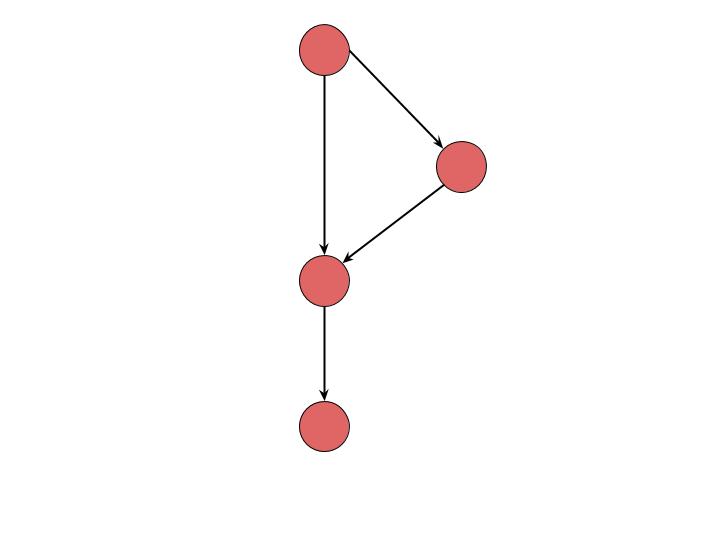
So in this diagram, we start at the first node and move to the second. Here we have our if statement and we can see that if the statement evaluates to True we move off to the node on the right, otherwise we go straight down to the next node. Then we follow it down to the last node.
Paths, Paths and More Paths
When we execute a program, it follows certain paths and path testing is about developing test cases that cause those different paths. On any path through a system, the behaviour may change as it is dependant on the previous paths taken. Path testing tries to identify different paths through a system and to identify the test cases. This raises our confidence in a system. When testing paths we make some basic assumptions about defects. It is assumed that a defect arises because the right decision was made at the wrong time or the wrong decision was made at the right time. So we therefore assume that the program took the wrong path.
There are two types of testing that are used for paths; Statement Testing and Branch Testing. Statement Testing is the most basic and every statement will be executed at least once. Branch testing is more defined and every outcome of every decision will be executed at least once. This is the coverage of these testing methods. Coverage is measured as a percentage and the formulas for measuring these are:
- Statement Coverage: (Statements executed / total statements) * 100
- Branch Coverage: (Branch outcomes executed / total branch outcomes) * 100
- Path Testing: (Paths executed / total number of paths) * 100
Statement coverage is the easiest path testing to achieve. Path testing is the most difficult as you need to identify and test every single path in a system.
Statement testing
There is a procedure for conducting this type of testing:
- Identify all executable statements.
- Trace execution from first statement.
- For every decision encountered, select the true outcome first and record predicates used to make it through.
- Continue until all statements have been covered.
Choosing the input values is called ‘sensitising the path’. In Statement Testing, statements are considered to be executable statements that tell one to do something.
Branch Testing
The coverage for this requires you to exercise all outcomes of a branch. You can use the tests from the Statement Testing to aid you in this.
Component Testing
This is performed on components in isolation. This will test functional requirements but also sometimes a few non-functional requirements. This type of testing is usually performed by developers. Things called a stub, driver and a simulator are used for this which will be explained shortly.
Integration Testing
Components will be integrated into a larger system. This is where integration testing comes in as we will need to test these integrations separately. An incremental approach may be first used in which you will start at the high level features. This type of testing is also performed by developers.
Test Driven Development
This is not connected to any particular phase of testing but is more of a method of thinking about testing. It provides a way of thinking about the operation of the software when it has been completed. It has the mentality that if you cannot test something in the software then it probably shouldn’t be implemented.
Stubs
So we briefly mentioned stubs earlier and now we can finally explain them. Stubs are temporary substitutes for components that haven’t been written yet. They simulate the code. They are used in top down approaches where we start at the top and gradually make our way down.
Drivers
On the other hand, drivers are used in bottom-up approaches. They are also temporary substitutes for unwritten components.
Stubs and drivers can be implemented in a script that interacts with the software or they can be implemented as a separate program or finally, may use a third party product to build it. Stubs and drivers may include logging and recording for tests as well as automated checking of logs for errors.
Component Integration Tests
These are tests designed to explore direct and indirect interfaces. Interfaces are statements which transfer control in programs. Parameters are passed from program to program and variables are defined at time of transfer. In the first stage of Component Integration Testing, code developed by different developers is combined. This can reveal inconsistencies.
Interface Testing
This generally uses a white box approach. Integration defects will reveal communication failures. Defects can include the wrong type of transfer of control, the wrong type or number of parameters, read-only global variables that are written to.
System and Acceptance Testing
These test the system as a whole and can require multiple drivers. System testing is defined as a systematic demonstration that all features are available and work as specified. The coverage for this is all documented features. Tests are designed around baseline documents and functional as well as non-functional requirements are tested. Functional System testing is concerned with testing the functional requirements. Non-Functional System testing is concerned with testing non-functional requirements.
Acceptance Testing
This is conducted from the user’s viewpoint. Essential features may be emphasised and the testing is based around how users use the system. This is usually a smaller scale test than the system test and can be a subset of the system tests.
Alpha and Beta Testing
Suppliers often want to hear feedback from their actual customers or users. Alpha testing usually takes place on the supplier’s site while beta testing is conducted by users of the site. This allows us to assess the reaction of marketplace to the product and to discover if features are missing, or if the product is ready for release.
Requirements based Testing
Acceptance tests and a few system tests are usually requirements based. We can analyse specifications documents and consider what features should be provided and what conditions should be covered. Requirements based tests help demonstrate that the supplier has met all requirements. Although there may be some problems with requirements as requirements often don’t give us enough information to conduct tests.
Testing by Intuition and Experience
A lot of testing is based on intuition and experience. Exploratory testing is an example of this.
Exploratory Testing
Sometimes the documents that should form the basis of a test do not exist or are of bad quality. Exploratory testing is mostly based on intuition and experience. Elements of the test object are ‘explored’ which can provide a basis to test from. Exploratory testing can also be done if we can’t tell what tests need to be run in advance. If we are executing scripting tests and we find something new, we may switch to exploratory testing.
We perform scripted testing when we know we know what we want to get, new tests are unimportant, we need accuracy and repeatability in the tests. Exploratory testing is good because it is less rigid and it allows the user to use creativity and intelligence to find defects which can be more effective. Exploratory testing has the mentality of trying to break the product. The tester will look for patterns, and document any defects as well as the test that exposed the defect.
Choosing Test Techniques
Black box testing is based on specifications so if the requirements are well-defined then you may use the black box techniques. However if we have poor basis documents then it is more favourable to do an exploratory test. Contractual requirements may require that the tester tests by a certain technique.
Test Team Roles
A test manager or team lead organises, plans and monitors the testing. The tester prepares test procedures, data, environments and expected results. They execute tests and log incidents. They also execute retests and regression tests. The test analyst defines the scope of the testing and conducts expertise interviews. They document test specifications and liaison with the test environment manager, technicians, users and testers. They also prepare test reports. The test automation technician records, codes and tests automated scripts. They prepare the test data, test cases and expected results. They also execute the log the results of the automated scripts and prepare reports.
Test Planning… again
Test planning is influenced by the test policy of the organisation, the scope of testing, objectives, risks, constraints, testability and the availability of resources. Planning takes place throughout the project. Test planning is a non-deterministic exercise where judgement and experience should be complemented with appropriate metrics as a means to managing uncertainty.
Test Planning Activities
- Define overall approach to testing
- Integrate testing activities into overall plan
- Scoping, assigning responsibilities, setting exit criteria
- Assigning resources for different tasks defined
- Defining amount, level of detail, structure and templates for the latest documentation
- Selecting metrics for monitoring and controlling test preparation and execution, defect resolution and risk issues
- Setting the level of detail for test procedures in order to provide enough information to support reproducible test preparation and execution.
Defect Severity
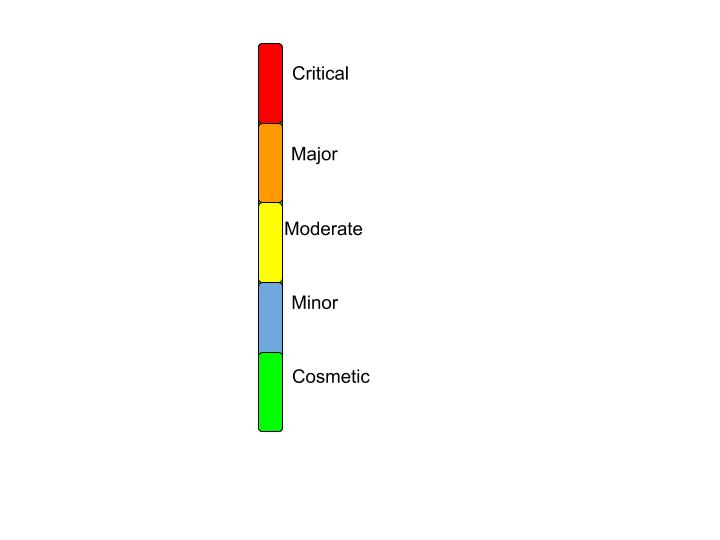
Severity is the extent to which a defect can affect software. They are five types:
- Critical: Results in the termination of a complete system or one or more components of a system and causes corruption of data. There is no alternative method to achieve required results.
- Major: Results in termination of complete system or one or more components of the system and causes corruption of data. The failed function is unusable but there is an alternative method to achieve required results.
- Moderate: Defect does not result in termination but causes the system to produce inconsistent, incorrect or incomplete results.
- Minor: Defect does not result in termination and does not damage usability of the system. Desired results can be easily obtained by working around the defects.
- Cosmetic: Defect is related to enhancement of the system where changes are related to appearance of application.
Defect Priority
The priority determined the order in which we should resolve defects.
- Low Priority: Defect should be fixed but can wait until a more serious defect has be fixed.
- Medium Priority: Defect should be resolved in normal course of development. It can wait until a new build or version has been created.
- High Priority: Defect must be resolved as soon as possible because it is affecting the product severely. The system cannot be used until the defect is resolved.
High Priority and High Severity: An error which occurs on the basis of functionality of the application and the user cannot use the system until it has been fixed.
High Priority and Low Severity: Spelling mistakes on cover page.
High Severity and Low Priority: An error which occurs on the functionality of the system and will not allow the user to use the system but on a link which is rarely used.
Low Priority and Low Severity: Cosmetic or spelling issues within a paragraph or report.
Decision Time
When the deadline arrives, the tests may now have to be stopped. The exit criteria may have to be changed but to do this the risk needs to be assessed and agreed with the customer. The changes should be documented. If the exit criteria are met, the software can be released to the next phase of production.
Test Estimation
The project manager will want you to predict how long testing has elapsed in time, how much effort will be needed, and what skills or resources are required. For each test you will need to prepare a plan. The estimation is a judgement based on experience and informed guesswork. It is usually a bottom-up activity as you start at the bottom and break everything down into subtasks. You will need estimated of all activities such as test planning, design, implementation, execution, test environment etc. Follow up activities will also need to be considered.
Contingency
Contingency accounts for under estimation as estimation is imprecise and prone to error.
Problems in Estimating
The total effort for testing is indeterminate. There are many things that you cannot predict. You should allow for all stages in the test process. Don’t underestimate the time it takes just for the setup.
Test Approaches
Preventative VS Reactive Test Approaches
One way to classify test approaches is based on the point in time at which the bulk of the design work is begun. In preventative approaches, the design work is done as early as possible. In Reactive Approaches, the design comes after the software production.
Selecting the Best Approach
The best approach is often to do with context. You need to consider:
- The risk of failure of the project, potential hazards and risks of product failure to humans, the environment and the company.
- The skills and experience of the team, tools and methods.
- The objective of the testing and the mission of the testing team.
- Regulatory aspects such as external and internal regulations for the development process.
- The nature of the product and the business.
Monitoring Test Progress
The purpose of test monitoring is to give feedback and visibility about test activities. Information to be monitored may be collected manually or automatically and may be used to measure exit criteria such as coverage. Metrics may also be used to assess progress against the scheduled plan and budget.
Common Test Metrics
- Percentage of work done in test case preparation.
- Percentage of work done in test environment preparation.
- Test Case Execution.
- Defect Information.
- Test Coverage of requirements.
- Testing Costs.
Configuration Management
Configuration management may involve ensuring that:
- All items of testware are identified, version controlled, tracked for changes, related to each other and related to development items.
- All identified documents and software items are referenced unambiguously in test documentation.
The configuration management procedures and infrastructure should be chosen, documented and implemented.
Stakeholders Objectives and Risks
A stakeholder objective is one of the fundamental objectives of the system to be built. Software risks are potential events or things that threaten the cardinal objectives of the project. A risk is a threat to one or more of the cardinal objectives of a project that has an uncertain probability. Risks only exist when there is uncertainty. If the probability of a risk is 0% or 100%, then the risk does not exist. There are risks associated with every project. Risks can be safety, political, economically, technical or security.
Three Types of Software Risk
Project risk: Includes resource constraints, external interfaces, supplier relationships and contract restrictions. This is a management responsibility.
Process Risk: Variances in planning and estimation, shortfalls in staffing, failure to track progress, lack of quality assurance and configuration management. Planning and the development process are the main issues.
Product Risk: lack of requirements, stability, complexity, design quality, coding quality, non-functional issues, test specifications. Requirements risks are the most significant risks reported in risk assessments.
Product Risks
Potential failure areas in the software are known as product risks, as they are risk to the quality of the product. Examples include: error-prone software, potential of the system to cause harm to an individual or company, poor software quality characteristics, software that perform its intended functions.
Process Risks
Poor Planning: Under/Over estimation, assignment of the wrongly skilled or under-skilled resources.
Poor Monitoring: Failure to monitor progress against plans, failure to monitor the results of testing.
Poor Controls: Failure to understand the impact of events occurring, failure to take any action or the wrong actions taken when confronted by problems.
Risk-Based Testing
Risks are used to decide where to start testing and where to test more. Testing is used to reduce the risk of an adverse effect occurring or reduce its impact. Product risks are a special type of risk to the success of the project. Testing as a risk-control activity provides feedback about the residual risk by measuring the effectiveness of critical defect removal and of contingency plans.
In a risk-based approach the risks identified may be used to:
- Determine the test techniques to be employed.
- Determine the extent of testing to be carried out.
- Prioritize testing in an attempt to find the critical defects as early as possible.
- Determine whether any non-testing activities could be employed to reduce risk (e.g. providing training to inexperienced designers).
Risk-based testing draws on the collective knowledge and insight of the project stakeholders to determine the risks and the levels of testing required to address.
To ensure that the chance of a product failure is minimised, risk management activities provide a disciplined approach to:
- Assess (and reassess on a regular basis) what can go wrong (risks).
- Determine what risks are important to deal with.
- Implement actions to deal with those risks.
In addition, testing may support the identification of new risks, may help to determine what risks should be reduced, and may lower uncertainty about risks.
Identifying Risks
The objectives of incident reporting:
- To provide developers and other parties with feedback about the problem
- To enable identification, isolation and correction as necessary.
- To provide test leaders a means of tracking the quality of the system under test and the progress of the testing.
- To provide an input to test process improvement initiatives.
We log incidents when a test result appears to be different from the expected result. This could be because:
- something wrong with the test.
- something wrong with the expected result.
- something wrong with the tester.
- a misinterpretation of the result.
- something wrong with the test environment.
- something wrong with the baseline.
- Or it could be a software fault.
The tester should stop and complete an incident report that describes exactly what is wrong, documents the test script and script step identifiers, attach any outputs (screen dumps or printouts) that may be useful, impact on your current tests.
Bug tracking software:
- Reporting facility – complete with fields that will let you provide information about the bug, environment, module, severity, screenshots etc.
- Assigning – What good is a bug when all you can do is find it and keep it to yourself, right?
- Progressing through the life cycle stages – Workflow
- History/work log/comments
- Reports – graphs or charts
- Storage and retrieval – Every entity in a testing process needs to be uniquely identifiable, the same rule applies to bugs too. So, a bug tracking tool must provide a way to have an ID, which can be used to store, retrieve (search) and organise bug information.
Final Farewell…
And so we have reached the end of a lengthy exploration of software testing that is by no means complete but offers us a solid foundation to build upon.
 Mastering Perception
Leave a comment